Running a custom jewelry business means balancing creativity with precision. You may be designing one-of-a-kind engagement rings, offering customizable wedding bands, or selling personalized jewelry online. But the technology required for each of these models can look very different.
A jewelry workshop creating bespoke pieces from scratch does not necessarily need the same tools as an e-commerce brand that lets customers choose a metal, gemstone, engraving, or setting online.
So, what do you need?
Do you need professional jewelry CAD software for creating production-ready designs? Flexible 3D design software for exploring new concepts? Or an interactive online design tool that lets customers customize jewelry directly on your website?
The answer depends on where customization happens in your business.
The best jewelry design software is the one that fits your complete customization workflow, from creating the design and controlling customization options to helping customers visualize their choices and preparing orders for production.
Let us look at the different technologies and where each one fits.

Key Takeaways
- The right jewelry design software depends on whether customization happens with designers, sales teams, or customers.
- Jewelry CAD software is ideal for creating precise, production-ready bespoke designs.
- 3D design software offers greater creative flexibility for concept development and visualization.
- A 3D product configurator helps customers personalize approved jewelry options without CAD expertise.
- Many custom jewelry businesses can benefit from combining backend CAD workflows with customer-facing customization tools.
- The best solution should support the complete journey from design creation and customization to order processing and production.
Jewelry CAD vs 3D Design Software vs Product Configurators
Not every jewelry design software solution is designed for the same person or purpose.
Some tools are built for professional designers creating precise, manufacturable models. Others give artists more creative freedom. Customer-facing configurators, on the other hand, focus on making personalization easier for shoppers and sales teams.
| Software Type | Primary User | Best Used For | Business Role |
| Jewelry CAD Software | CAD designers and jewelers | Production-ready models, stone settings, precise dimensions | Design and manufacturing |
| 3D Design Software | Designers and visual artists | Freeform modeling, concept development, visualization | Creative exploration |
| 3D Product Configurator | Customers and sales teams | Choosing metals, stones, sizes, styles, and engravings | Customer customization and sales |
Jewelry CAD Software: Built for Precision
Jewelry CAD software is best for businesses creating original pieces that require exact dimensions, detailed stone settings, and manufacturing-ready models.
Professional CAD tools allow designers to create precise digital models of rings, pendants, earrings, bracelets, and other jewelry pieces. Designers can work with measurements, stone placements, prongs, settings, and metal geometry before preparing a model for manufacturing.
Dedicated jewelry CAD design software is particularly useful for bespoke studios where every commission may require unique modifications.
Depending on the workflow, jewelry designers may use specialized environments such as Rhino-based jewelry workflows, MatrixGold, or 3Design. Freeform tools can also support more sculptural and artistic workflows.
The main advantage of CAD is control. The trade-off is that it requires technical knowledge and is usually operated by trained designers rather than customers.
3D Design Software: Built for Creative Exploration
3D design software is useful when creative flexibility and visual exploration are more important than jewelry-specific manufacturing controls.
Broader 3D design software can help artists experiment with organic shapes, sculptural forms, and complex visual concepts. In 3D design software jewelry workflows, these tools may be used during concept development, client presentations, or the creation of realistic product visuals.
This type of product design software can be valuable when your team needs more creative freedom before moving a concept into a production-focused workflow.
3D Product Configurator: Built for Customer Customization
A 3D product configurator is designed to help customers personalize approved jewelry options without requiring CAD knowledge.
Instead of creating a design from scratch, a shopper can interact with an existing product and customize available elements, such as:
- Metal type
- Gemstone
- Stone shape
- Ring size
- Band style
- Engraving
- Available settings
The configurator becomes an interactive online design tool, allowing customers to see their selections before making a purchase.
This is particularly useful for semi-custom jewelry brands that want to offer personalization without sending every customer request through a manual CAD process.
What Is The 3-Layer Jewelry Customization Stack?
One of the biggest mistakes businesses make when evaluating jewelry technology is treating CAD and customer customization as the same thing.
They are part of different layers of the workflow.
Layer 1: Design Creation
This is where professional designers create original jewelry models.
Depending on the complexity of the product, this may involve jewelry CAD software or other professional 3D modeling tools. The goal is to create a base design with the required technical and aesthetic specifications.
Layer 2: Customization Rules
This layer determines what customers are actually allowed to change.
For example, a business may allow customers to choose between three metals, five gemstones, and two band widths while restricting combinations that are too expensive, technically incompatible, or difficult to manufacture.
This layer is essential for scalable customization.
Customers should have flexibility, but not unlimited freedom that results in non-manufacturable jewelry.
Layer 3: Customer Experience
This is where the customer interacts with the product.
A 3D product configurator presents approved customization choices through an intuitive interface. Customers can experiment with options, visualize the product, and make decisions without needing to understand CAD software.
Together, these three layers create a more scalable approach to custom jewelry.
When Does Your Jewelry Business Need CAD, Configurator, or Both?
The right technology depends on how much customization you offer and who performs it.
You Need CAD When You Create Bespoke Jewelry from Scratch
If your business regularly designs one-of-a-kind pieces, professional CAD tools are essential.
You may need dedicated jewelry design software when:
- Every commission starts with a unique concept.
- Stone placements vary from project to project.
- Designs require precise dimensions.
- Your team prepares models for 3D printing and casting.
- Manufacturing teams require detailed production specifications.
In these cases, CAD remains central to the workflow.
You May Need a Configurator for Structured Customization
Not every customer wants to start with a blank page.
Many jewelry buyers simply want to personalize an existing design. They may want to change the metal, select a different gemstone, adjust the ring size, or add an engraving.
For this type of semi-customization, an interactive configurator can reduce manual back-and-forth while still giving customers a meaningful level of creative control.
In many cases, you need both. CAD and product configurators do not have to compete.
A more scalable workflow can look like this:
Designer creates the master design >> Business defines approved customization rules >> Customer selects options >> Final configuration is captured >> Production team prepares the order
The customer-facing design experience and the backend production workflow can operate as separate but connected parts of the same process.
What Should You Look for in Custom Jewelry Design Software?
The best software for your business should do more than create attractive visuals. It should support the way your products are designed, customized, sold, and produced.
Can You Modify Designs Without Rebuilding Everything?
Minor customization should not always require a complete redesign.
Look for flexible custom jewelry design software that supports editable product elements and reusable design components. This can make it easier to accommodate changes such as ring size, gemstone selection, or band variations without recreating the entire design.
For businesses managing multiple product variations, reusable design structures can also improve consistency across the catalog.
Can Customers Visualize Their Choices Clearly?
Customization becomes easier when customers can see the result of their decisions.
Look for features such as:
- Interactive 3D visualization
- Product rotation
- Material and color changes
- Different stone options
- Real-time configuration updates
Visualization is particularly important for online jewelry sales, where customers cannot physically handle the product before purchasing.
Can the System Prevent Invalid or Non-Manufacturable Combinations?
This is one of the most important requirements for a scalable jewelry customization workflow.
Your business may not want customers to select a gemstone that does not fit in a particular setting or combine options that cannot be manufactured together.
The right solution should help you define product rules around:
- Compatible stone sizes
- Available settings
- Metal options
- Product dimensions
- Allowed engraving areas
- Product-specific customization limits
This allows businesses to offer personalization while maintaining control over quality and manufacturability.
Can the Customization Move into Your Production Workflow?
A visually appealing configuration is only useful if the business can act on the information. Consider how the selected options move from the customer experience into your internal workflow.
Depending on your technology stack, you may need the system to capture:
- Selected product options
- Customer specifications
- Material choices
- Stone details
- Order-level customization information
This reduces the gap between what the customer selected and what your team ultimately produces.
What Happens After a Customer Designs Jewelry Online?
A customer-facing configurator should be part of a workflow, not the end of it.
Once a customer finishes customizing a product, the business still needs to translate those choices into an actionable order.
A typical workflow may look like this:
Customer customizes the product >> System validates the selected options >> Final configuration is saved with the order >> Production team receives the required specifications >> Jewelry moves into manufacturing or fulfillment
The exact process depends on how your business manages production.
Some businesses may use a configurator primarily for visualization and still require manual design preparation afterward. Others may connect product configuration data more closely with internal production or order-management workflows.
Understanding this distinction is important when comparing solutions.
A beautiful configurator alone does not automatically create a complete manufacturing workflow. Businesses should evaluate how customization data fits into what happens next.
What Does the Best Software Strategy Depend on?
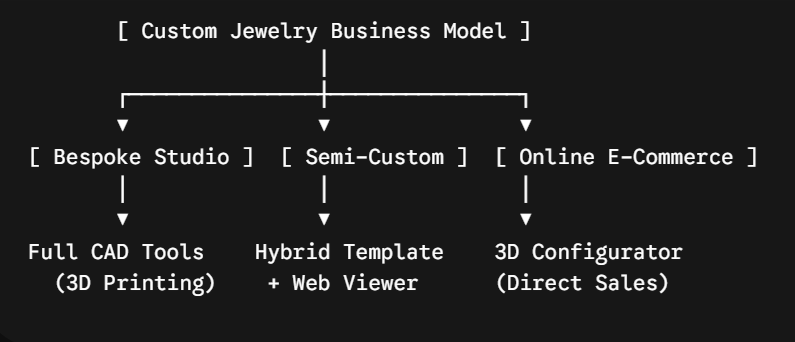
Instead of searching for one universally best platform, start with your operating model.
1. The Bespoke Jewelry Studio
If your business creates high-value, one-of-a-kind jewelry, a CAD-first workflow makes the most sense.
Your priority is:
- Precision
- Design freedom
- Detailed stone settings
- Manufacturing accuracy
- Production-ready models
Professional jewelry CAD software is likely to remain at the center of your process.
2. The Semi-Custom Jewelry Retailer
If you sell established designs that customers can personalize, a hybrid approach may work better.
Your backend team can maintain the core design while customers or sales representatives customize approved elements.
For example, a customer might select:
- Yellow, white, or rose gold
- Different center stones
- Multiple stone shapes
- Ring sizes
- Engraving options
This model combines professional design control with a simpler customer experience.
3. The Online Custom Jewelry Brand
For e-commerce businesses, the buying experience becomes especially important.
Customers want to understand how their choices will affect the final product without waiting days for a manual design proof.
A customer-facing 3D product configurator can help shoppers customize and visualize jewelry directly on the website while keeping the available options within predefined business rules.
Why Interactive 3D Customization Changes the Jewelry Buying Experience?
Traditional customization often involves multiple steps.
A customer explains what they want. The sales team communicates with a designer. A visual is created. The customer requests changes. The process is repeated.
That workflow may be necessary for highly bespoke jewelry. But it can become inefficient for structured customization.
Interactive 3D customization offers another approach.
Customers can explore available options themselves and immediately see how different selections affect the product.
This can help businesses:
- Make product customization easier to understand.
- Reduce repetitive communication around basic changes.
- Give customers more confidence in their selections.
- Allow sales teams to demonstrate options more effectively.
- Create opportunities for customers to explore premium materials or product variations.
3D customization does not replace craftsmanship with technology.
It uses technology where it can simplify the decision-making process while allowing designers and jewelers to focus on the work that actually requires their expertise.
How to Choose the Right Jewelry Design Solution for Your Team?
Before investing in new software, answer three questions.
1. Who Is Doing Customization?
Is it:
- A trained CAD designer?
- A salesperson in a showroom?
- An online customer?
The answer will significantly influence the type of interface and technology you need.
2. How Complex Is Customization?
Are customers simply selecting from predefined options? Or are they creating completely original pieces with unique specifications?
The more complex the customization, the greater the need for professional design expertise and CAD capabilities.
3. What Needs to Happen After Customization?
Does customization only need to generate a product preview? Or does the selected configuration need to move into an internal production process?
Understanding what happens after the customer selects will help you evaluate whether you need a standalone visualization tool, a configurator, CAD software, or a combination of technologies.

Conclusion
The right jewelry design software is not necessarily the most complex platform available. It is the technology that fits the way your business actually operates.
If your team creates one-of-a-kind designs, CAD may be essential. If you offer structured customization, a 3D configurator can make the experience easier for customers and sales teams. And for many businesses, the strongest approach is not choosing between CAD and customization technology but combining them within the right workflow.
iDesigniBuy helps businesses create interactive product customization experiences customized to their catalog and sales process. For jewelry brands, this can mean giving customers an easier way to explore approved customization options without requiring them to understand complex design software.
Frequently Asked Questions
1. What is the difference between jewelry CAD software and jewelry configurator?
Jewelry CAD software is primarily used by professional designers to create precise digital models. A jewelry configurator is designed for customers or sales teams to personalize approved product options without requiring CAD expertise.
2. Can customers design jewelry online without CAD experience?
Yes. An online design tool or 3D product configurator can allow customers to personalize predefined elements such as metals, gemstones, sizes, and engravings without using professional CAD software.
3. What is the best software for jewelry design?
The best software for jewelry design depends on the business workflow. Bespoke studios may require advanced CAD tools, while semi-custom and e-commerce businesses may benefit from customer-facing 3D customization technology.
4. Can a 3D product configurator work with a custom jewelry business?
Yes. A 3D product configurator can be particularly useful for businesses offering structured customization. It allows customers to personalize approved options while the business maintains control over product rules and available combinations.