Women Shoe Designer Software

Men shirt design software shown on laptop, tablet and smartphone
Overview

Dedicated to all the doers out there. iDesigniBuy will help set your ideas in motion. Rapidly craft Women’s formal Shoes and start prototyping today with our drag-and-drop solutions that shorten development cycles from days to hours. And that’s only the beginning.

iDesigniBuy has established itself as the standard by which all other design software is measured. It’s simply the best and easiest to use solution as your online shoes designer tool. Our advance shoe designer tool allows your customers to put their own signature style to their design per their own taste.

The basis of the iDesigniBuy designer tool is centered on its highly advanced 3D views during the designing your product. The tool is developed using the most modern of technologies making it faster and responsive to a variety of devices. Customers can virtually view all angles of product while designing their unique style.

iDesigniBuy offers personalized shoe designing, providing your customer choices from multiple styles and many varieties of fabric, materials, and colors. You can allow them to upload their logo or write initials.

iDesigniBuy’s shoes designer tool can be easily integrated with your website regardless of the type of Ecommerce platform you are using.

Solution Highlights

Our intellectual tools with complete customization features have enticed many customers towards us and it is a certain thing that it would attract even more clients towards us.

  • Fully customized Women’s Formal Shoe designer tool solution
  • Complete E-commerce store front.
  • Pre-built fonts, images, clipart and colors.
  • Available with a lifetime license.
  • Detailed user manual and training videos.
  • 30 Days warranty with free support. Optional annual support plans available.
Features of

Women Shoe Designer Tool

Enhance your shoe offering styles and styles. Enable your customers to make the most of plentiful features that our Shoe designer tool comes with. Our fully responsive Shoe design tool makes it easy for your customers to create stylish ad-hoc designs on Shoes with just a few clicks.

Mobile Responsive layout

1. Mobile Responsive layout

  • Work on all standard Screen size.
  • Consistent user experience across all devices.
Localize in any Language

2. Localize in any Language

  • Localize in any language & Currencies.
  • Support multi-store, multi-language.
Selection of Shoe

3. Selection of Shoe

  • Shoe designer software has extensive selection of shoe products.
  • User can go for a heel, flat, boots and sandals based on their personal likings.
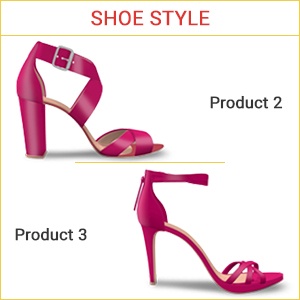
Shoe style

4. Shoe style

  • Our custom shoe design software makes it possible for users to select any of the style.
  • They can go with any shoe style as per their individual taste.
Size

5. Size

  • What can be more interesting for your users that they can select the size & width of shoe accordance with their feet measurement.
Select Shoes Part

6. Select Shoes Part

  • It lets them tailor the Back style, Toe, Heel, Strap, and any other part of the shoe.
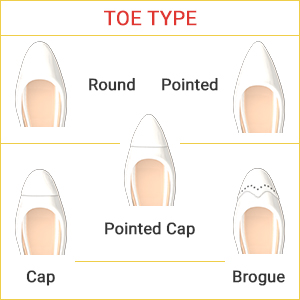
Toe Type

7. Toe Type

  • Choose the toe type of selected shoe style e.g. Round, Pointed, Cap, Pointed cap etc.
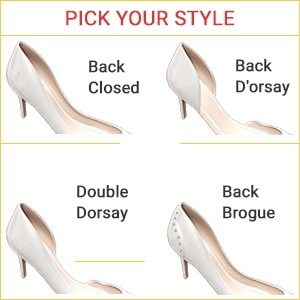
Select Style

8. Select Style

  • User can choose the style of selected shoe style as per their taste e.g. Back Closed, Back Dorsay, Double Dorsay, Back Aling.
Heel Size

9. Heel Size

  • It is possible for user to select the size of heel for shoe in accordance with their choice.
  • User can go for 1.40 heel size, 3.90, 5.20 heel size etc.
Heel Type

10. Heel Type

  • User can browse the collection of heel type & able to choose heel type based on their personal liking such as stiletto, platform heel, Kitten Heels, Ankle Strap Heels, Pumps etc.
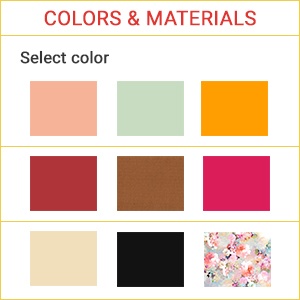
Colors & Materials

11. Colors & Materials

  • Select part of shoe, then select the colors to apply on different parts of shoe.
Extra/Decorations

12. Extra/Decorations

  • User can design the shoe by applying decorations such as bow, diamonds, flowers on it based on their choice.
Rotate

13. Rotate

  • Before getting a final output, it is simple to rotate the shoes in 8 angular view to watch a customized show.
Review

14. Review

  • If you have any special requests for shoe then enter here your request.
Pre-Designed Shoes

15. Pre-Designed Shoes

  • User can browse an extensive collection of pre-designed shoes.
  • User can customize pre-designed shoe as per their needs.
Erase Designs & Start Again

16. Erase Designs & Start Again

  • This software also offers feasibility to the users to erase the designs.
  • For instance, if they do not like the concept of flowers in their shoes so they can erase and change it.
Preview of Shoe

17. Preview of Shoe

  • Our advanced online shoe design Software allows user to get a preview of their designed shoes.
Order

18. Order

  • Selected shoe category, model, size of Shoe, style, toe type, heel type, heel size, color & Materials, extras, special request, price and quantity.
Share Design

19. Share Design

  • Share design on social media.
Save Design

20. Save Design

  • Save design to your account for future use.
Add to cart

21. Add to cart

  • Add the designed Women Shoe to cart for placing order.
Undo, Redo Design

22. Undo, Redo Design

  • Undo, Redo your design changes.
Email Design

23. Email Design

  • Email your created design by entering email.
Download

24. Download

  • Download the designed Shoe on your device.
Zoom-in/Zoom Out

25. Zoom-in/Zoom Out

  • Zoom-in/Zoom-out design to view the Women Shoe properly.
Print Design

26. Print Design

  • Print your created design of Women Shoe.

Implement Women Shoe designer tool with any e-commerce platform of your choice or integrate it in your existing website.

Magento
Shopify
Presta
Virtuemart
PHP
.NET
Bigcommerce
Woocommerce

Solution partner of leading tailoring companies

Guide Document

Guide Document

Training video

Training video

Help desk Call

Help desk (Call)

E-mail

E-mail

Testimonials

FREQUENTLY ASKED QUESTIONS

The tool supports multiple women’s shoe styles, including heels, flats, boots, and sandals. Businesses can offer these styles as part of a broader women’s footwear customization experience.
Customers can personalize available shoe components such as the laces, eyelets, zipper, sole, and other configured parts, along with selecting colors for those components.
The product supports personalization using leather and inner-lining options, as well as letters, symbols, and logos, depending on the configured design attributes.
The product page indicates that customized orders can contain measurement information along with the selected shoe type, style, materials, personalization, quantity, and price.
The 3D view allows customers to see the shoe from different angles while making design selections. This gives them a clearer visual reference for the customized style before completing the order.