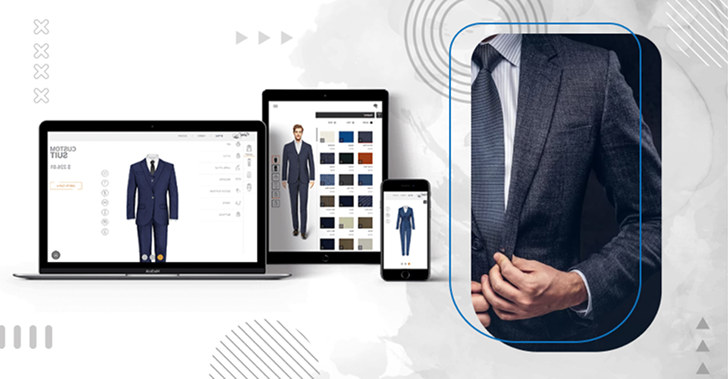
Men Suit Design Software

Men suit design software shown on laptop, tablet and smartphone
Overview

The clothing design software from iDesigniBuy enables you to hook up your fabric collection and organize designed suites for your online store.

IDesigniBuy is the team of Business experts. Our online tailoring software is designed to help you generate more leads, fulfill new generation customers, close deal faster and sell service in smarter ways,

This tool is crafted keeping in mind the success of several tailoring businesses. Our suit designer tool has been established to support the sales of custom made garments such as suit, pant, and vest. Showcase your fabrics and your workmanship. Through this custom tailoring software, business people can focus on their client's needs to fulfill their requirement.

In addition to this, designer tool support multiple currencies and languages like English, Arabic, German, French etc.

Solution Highlights

Our intellectual tools with complete customization features have enticed many customers towards
us and it is a certain thing that it would attract even more clients towards us.

  • We develop fully customized and bespoke Suit
    designer tool solution as per business needs.
  • Designer tool built on Javascript/HTML5 that
    runs on all devices and platforms
  • Pre-loaded styles, fabrics and accents.
  • 30 Days warranty with free support.
    Paid support available on easy AMC plans.
  • We offer complete tailoring e-commerce store front
    integrated with Suit designer tool.
  • 30 Days warranty with free support. Paid support
    available on easy AMC plans.
  • Detailed user manual and training videos.
Features of

Suit Designer Tool

Our features rich suit designing software allows user to personalize Suit with styles, fabrics and accents.

Mobile Responsive layout

1. Mobile Responsive layout

  • Work on all standard Screen size
  • Consistent user experience across all devices
Localize in any Language

2. Localize in any Language

  • Localize in any language & Currencies
  • Support multi-store, multi-language
Preview for Jacket

3. Preview for Jacket

  • Front view
  • Back view
  • Folded view
Preview for Pant

4. Preview for Pant

  • Front view
  • Back view
  • Folded view
Preview for Vest

5. Preview for Vest

  • Front view
  • Back view
  • Folded view
Zoom In Out

6. Zoom In/Out

  • Zoom In/Zoom Out
Fabric library for Jacket vest and pant

7. Fabric library for Jacket, vest & pant

  • Add/Delete/Edit Fabric with price
  • Fabric Inventory management
Multiple style

8. Multiple style

  • Multiple style options for Jacket
Jacket Fit

9. Each style has multiple option to select.

  • For example Jacket Fit has multiple options
Jacket style

10. Jacket style

  • Jacket style has following options
Jacket lapel

11. Jacket lapel

  • Jacket lapel has following options
Jacket lapel size

12. Jacket lapel size

  • Jacket lapel size has following options
Jacket pockets

13. Jacket pockets

  • Jacket pockets has following options
Jacket sleeve buttons

14. Jacket sleeve buttons

  • Jacket sleeve buttons has following options
Jacket vent

15. Jacket vent

  • Jacket vent has following options
Multiple style options

16. Multiple style options

  • Multiple style options for Pants
Pant pleats

17. Pant pleats

  • Pant pleats has following options
Pant fastening

18. Pant fastening

  • Pant fastening has following options
Pant pockets

19. Pant pockets

  • Pant pockets has following options
Pant cuffs

20. Pant cuffs

  • Pant cuffs has following options
Multiple style for Vest

21. Multiple style

  • Multiple style options for Vest
Vest style

22. Vest style

  • Vest style has following options
Vest Edge

23. Vest Edge

  • Vest Edge has following options
Vest lapel

24. Vest lapel

  • Vest lapel has following options
Vest pockets

25. Vest pockets

  • Vest pockets has following options
Vest breast pockets

26. Vest breast pockets

  • Vest breast pockets has following options
Vest buttons

27. Vest buttons

  • Vest buttons has following options
Accent Brass Buttons

28. Accent-Brass Buttons

  • Apply different brass button accent to Suit (Jacket, Pant, vest)
Accent Threads

29. Accent-Threads

  • Add/delete/Edit thread colors to suit (Jacket, Pant, vest)
Accent Pocket Square

30. Accent-Pocket Square

  • Apply different colors to pocket square of suit (Jacket, Pant, vest)
Accent Lining

31. Accent-Lining

  • Apply different colors to lining of suit (Jacket, Pant, vest)
Order

32. Order

  • Selected Fabric, body measurement, preview of Suit, selected all attributes of styles. Monograms, Price, Quantity
Add Body type custom size

33. Add Body type

  • Suit Custom size
Add Body type standard size

34. Add Body type

  • Standard Size
Virtual trial room size

35. Virtual trial room

  • Select size & view how it looks
Virtual trial room background

36. Virtual trial room

  • Select photo & background and view how it looks
Fabric Filter

37. Fabric Filter

  • Select fabric of your choice by applying different filter parameters
Fabric Zoom

38. Fabric Zoom

  • Mouse hover on selected fabric to view zoom in of the fabric
Accent Back Collar

39. Accent- Back Collar

  • Select the different collar type for applying on suit
  • Select the fabric for applied collar type
Accent Elbow Patch

40. Accent- Elbow Patch

  • Select the different elbow patch for applying on suit
  • Select the fabric for applied elbow patch
Apply Different or same fabric

41. Apply Different/same fabric

  • Select you want to apply same/ different fabric to Jacket, Pant & Vest
  • If different then fabric apply differently on Jacket, Pant & vest
View select attributes

42. View select attributes

  • View all selected attributes before placing order on cart page

How Does Suit Design Tool Work

IDesigniBuy an apparel design software, works effectively and creates customized suits for tailoring business needs. Our integrated suit design software tool offers a huge range of options to make suits with a simpler process and easy to use. After understanding our client's perspective, we not only took into consideration their current business structure but also looked forward to scalability.

Integrating our suit design tool into your website platform enables users to choose and customize fabrics and seek attention to style, including collar style, pocket, buttons, cuff style, and color; from a huge variety of options, you can select a perfect jacket for your suit. Also, you can customize your suit pants as per your preferences. A user-friendly suit design tool offers an exclusive design layout, provides customized features according to the business requirements, and builds different designs of suits for your customers.

Man in tailored suit at a clothing store

Enhance Your Tailoring Suit Business Productivity

Amplify your creativity in your suit by integrating with the latest iDesigniBuy Suit design tool. The suit design tool offers customers an apparel design software implementation linked successfully to various websites of tailoring stores or companies and facilitates customers to enhance the productivity of their businesses.

Implement Suit designer tool with any e-commerce platform of your choice or integrate it in your existing website.

Magento
Shopify
Presta
Virtuemart
PHP
.NET
Bigcommerce
Woocommerce

Solution partner of leading tailoring companies

Guide Document

Guide Document

Training video

Training video

Help desk Call

Help desk (Call)

E-mail

E-mail

FREQUENTLY ASKED QUESTIONS

A suit design tool is online software that lets shoppers build a custom suit — jacket, pant, and optionally a vest — by choosing fabric, fit, lapel style, pockets, and other details through a visual configurator before placing an order. It replaces static product pages with an interactive experience that shows a live preview of the finished suit.
A 2-piece suit configurator lets customers customize a jacket and pant, while a 3-piece configurator adds a vest to the mix, with matching or contrasting fabric and style options for all three pieces. Retailers can offer either format depending on their product catalog.
Customers can typically customize jacket fit, lapel style and size, pockets, sleeve buttons, and vent; pant pleats, fastening, pockets, and cuffs; and vest style, edge, lapel, pockets, and buttons. Accents like brass buttons, thread color, pocket square, lining, back collar, and elbow patch can be layered on top for further personalization.
Yes, a suit design tool can let customers choose the same fabric across all pieces for a matched look, or apply different fabrics to the jacket, pant, and vest individually for a mix-and-match style. Some platforms also support applying two fabrics within a single piece (for example, a contrast collar) as a custom development request.
Most suit configurators show high-resolution front, back, and folded views for each piece rather than a full 3D rotation, updating in real time as the customer changes fabric or style. Zoom-in/zoom-out functionality lets shoppers inspect fabric texture and stitching detail before ordering.
Yes — when paired with a virtual trial room feature, customers can select a body size or upload a photo to preview how the customized suit will fit and look on them, not just on a flat mockup. This helps reduce sizing uncertainty for made-to-order garments.
Standard-size ordering lets customers pick from preset sizes like S, M, and L, while custom-size ordering lets them enter individual body measurements for a made-to-measure fit. A suit design tool can offer both options side by side so shoppers choose based on how precise a fit they want.
Yes, fabric libraries are typically managed from an admin panel where a business can add, edit, delete, and price fabrics, as well as track fabric inventory. This lets retailers update their catalog seasonally without needing developer support.