Summary :
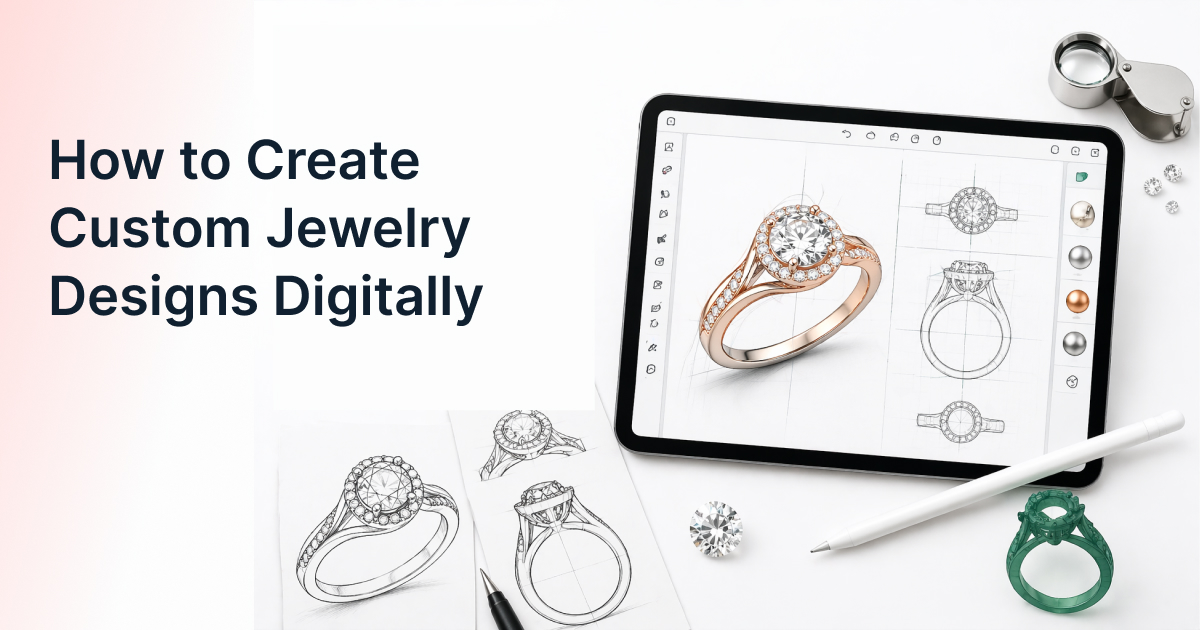
Creating custom jewelry designs digitally requires a strategic transition from static physical inventory to dynamic digital assets that can be manipulated by the end-user. By implementing Jewelry Design Software, business owners can map out specific design constraints and variables, such as stone cuts, metal types, and setting styles to build an interactive experience. This guide breaks down the four essential stages of digital design: asset preparation, logic configuration, real-time visualization, and production output.
How to Create Custom Jewelry Designs Digitally: The Step-by-Step Creative Roadmap
For decades, the “how” of custom jewelry was a manual, high-friction process: a paper sketch, a hand-carved wax model, and a lot of hoping the customer wouldn’t change their mind halfway through. Digitizing this workflow doesn’t just make it faster; it makes it a repeatable system.
To create custom jewelry designs in a digital environment, you are essentially building a modular kit of parts. Instead of designing one finished ring, you are designing a “system” where stones, shanks, and settings can be swapped instantly while maintaining structural integrity.
Step 1: Building the Digital Foundation (Asset Creation)
The first step in how to create custom jewelry digitally is the creation of your “master” assets. You cannot have a configurator without high-fidelity digital twins of your physical inventory.
- 3D Modeling (CAD): Most digital designs begin as STL or OBJ files created in jewelry-specific CAD software. These files define the geometry of your rings, earrings, and pendants.
- Component Separation: Unlike a static 3D model, a digital design for customization must be “exploded.” You need separate digital files for the band (shank), the head (setting), and the stones. This modularity is what allows the advantages of using jewelry design software for jewelry designers to shine, as it enables thousands of combinations from a handful of core parts.
- High-Res Rendering: Once the geometry is set, you apply “materials”—digital shaders that mimic the light reflection of 18k gold, platinum, or the specific fire of a round-cut diamond.

Step 2: Defining the Variables (Attribute Mapping)
Once your assets are ready, you must define what the customer can actually change. This is where you translate the “bespoke” experience into a menu of options.
When using jewelry design software, you map out your attributes in categories:
- Metal Type: Yellow gold, white gold, rose gold, platinum.
- Stone Specifications: Shape (Round, Pear, Marquise), Type (Diamond, Sapphire, Lab-grown), and Carat weight.
- Setting Style: Prong, bezel, pavé, or tension settings.
- Personalization: Text engravings on the inner or outer band.
By defining these variables, you are setting the boundaries of the “sandbox” your customer will play in.
Step 3: Establishing Design Logic (The Guardrails)
The most critical part of digital jewelry design is the logic. In the physical world, a jeweler knows that a 4-carat stone won’t fit on a 1mm wire-thin band. In the digital world, the software must know this too.
You must establish “If-This-Then-That” (IFTTT) rules:
- Compatibility Rules: If a customer selects an “Emerald Cut” stone, the software should only show “Emerald-compatible” heads or settings.
- Pricing Logic: The price must be dynamic. The software calculates the “base price” (the metal weight) + the “component price” (the specific stone) + the “labor” (setting fees) in real-time.
This step ensures that any design created by a customer is actually manufacturable. This is one of the essential features of modern jewelry design software, it acts as a digital gatekeeper for your workshop.
Step 4: The Production Handoff (From Screen to Bench)
The final “how” of the process is turning that digital interaction into a physical object. A common mishap for boutiques is having a great-looking website that sends “messy” data to the jeweler.
A professional digital workflow should output:
- A Detailed Spec Sheet: A PDF or digital file listing every attribute selected.
- The Component SKUs: A list for your inventory team to pull the specific stones and semi-mounts.
- 3D Files for Printing: In many high-end setups, the final configuration generates a unique STL file that can be sent directly to a 3D wax printer for casting.
Comparison of Design Workflows
| Stage | Traditional Manual Workflow | Digital Design System |
| Initial Visualization | Hand-drawn pencil sketches | Real-time interactive 3D rendering |
| Iterative Changes | Redrawing or carving new wax | Instant clicks to swap components |
| Price Quoting | Manual math (prone to error) | Automated, real-time pricing |
| Manufacturing | Interpreting artist notes | Using precise digital specifications |
Scaling Beyond the One-Off
Creating custom jewelry designs digitally allows you to move from “bespoke” (starting from zero) to “mass customization” (configuring from a set of parts). This is the secret to scaling a jewelry business. You can serve 1,000 customers simultaneously with a digital tool, something that would require a massive team of designers to do manually.
By focusing on the “how”, the modularity, the logic, and the production output, you build a business that isn’t just high-tech, but high efficiency.
Every jeweler has a unique way of working on the bench. If you’re ready to translate your physical craft into a high-performing digital system, let’s talk about how to map your specific workflow into a tool that grows with you.

Frequently Asked Questions
1. What file formats do I need to start creating digital jewelry designs?
Most platforms require 3D files in STL or OBJ formats for geometry, combined with high-resolution texture maps (for metals and gems) to ensure the render looks realistic on your website.
2. How do I ensure the digital design looks like the real metal?
This is achieved through PBR (Physically Based Rendering). Your software should allow you to adjust “reflectivity,” “roughness,” and “refraction” settings to ensure your 18k yellow gold doesn’t look like yellow plastic.
3. Can I limit what a customer can design?
Yes, and you should. Setting constraints is a vital part of the creation process. You can restrict stone shapes based on the chosen setting or limit ring sizes based on the shank style to ensure structural integrity.
4. How does the software handle different stone carats?
In the design setup, you create “scales.” For every stone shape, you provide the digital models for different carat weights. The software then swaps these models out as the customer adjusts their preference.
5. How long does it take to digitize a jewelry collection?
It depends on the complexity, but once you have your “master” 3D models, setting up the customization logic for a full collection typically takes a few weeks, rather than months of manual work.