Custom apparel has evolved from a niche offering into an important e-commerce category. As shoppers look for more personalized products, online retailers are giving customers greater control over colors, artwork, text, and other design elements. If your store only offers off-the-shelf products, you are leaving money on the table.
Integrating a high-performance hoodie design tool transforms passive shoppers into active creators. Giving customers total creative freedom boosts engagement, drives conversions, and sets your brand apart.
This guide reveals how to choose the right software to scale your online store.
Why Is Custom Apparel E-Commerce Booming?
Shoppers value personal expression over mass production. The demand for customized fashion has surged rapidly worldwide.
hood
Adding a hoodie design tool gives way to this revenue. A hoodie customizer lets buyers build unique products. This increases user engagement. High engagement leads to higher order values.

What Is a Hoodie Design Tool?
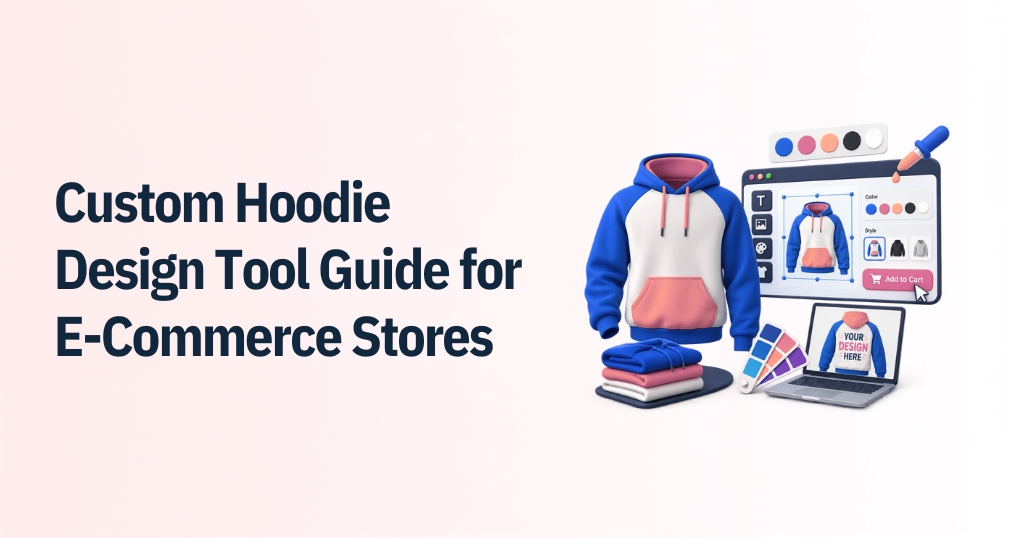
A hoodie design tool is interactive web software. It connects to online storefronts. Customers pick colors, upload graphics, and add text in real time. An online hoodie designer provides realistic 3D previews. Buyers check sleeve graphics, pocket placement, and back prints before buying.
This helps customers understand how their finished hoodie is expected to look before placing an order.
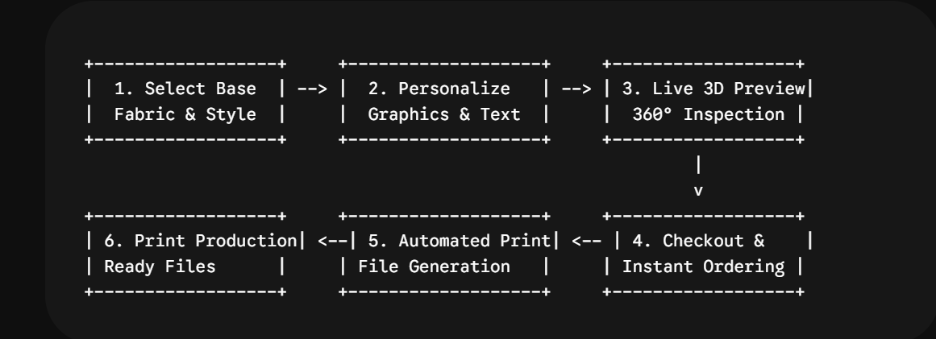
Key capabilities of an online hoodie designer include:
- Interactive Asset Uploads: Add high-resolution logos, vector graphics, or photos easily.
- Text Formatting Controls: Adjust fonts, curved text, sizing, and color swatches.
- Realistic 3D Previews: Inspect 360-degree views of sleeves, pockets, and back prints.
- Multi-Zone Editing: Personalize distinct design areas without overlapping artwork errors.
- Automated Print Output: Export print-ready SVG, PDF, or PNG production files.
How Does a Hoodie Customizer Benefit Your E-Commerce Store?
Integrating a hoodie customizer transforms passive visitors into active creators. Interactive tools boost standard site performance.
| Strategic Advantage | Business Impact |
| Higher Conversion Rates | Interactive design experiences keep visitors longer. |
| Lower Return Rates | 3D visual previews set clear product expectations. |
| Premium Pricing Power | Custom clothing commands higher profit margins. |
| Automated Orders | System creates print-ready files instantly. |
Higher Conversion Rates
Interactive design experiences keep visitors engaged longer on your website. Shoppers spend time customizing colors, text, and artwork directly on base products. This hands-on interaction creates a feeling of product ownership. That psychological connection leads directly to higher sales conversion rates.
Lower Return Rates
Realistic 3D visual previews set exact expectations before purchasing. Customers inspect print scale, colors, and placement on sleeves or pockets. Clear visual confirmation prevents misunderstandings about the final product. Setting accurate expectations drastically reduces product return rates.
Premium Pricing Power
Custom clothing commands higher profit margins than standard stock items. Buyers value unique self-expression and personal branding over mass-produced garments. They gladly pay extra for custom-made apparel that reflects their identity. This pricing flexibility expands overall profit margins for your store.
Automated Orders
The software can generate production-ready design files when an order is placed, reducing the need for manual file preparation. It generates production-ready vector outputs without requiring manual prepress tweaks. Eliminating manual file preparation saves your operational team valuable time. Fast order processing helps scale operations without extra administrative overhead.
Using hoodie customization software for e-commerce manages storefront operations. It eliminates manual artwork approvals. Your team spends less time fixing production files.
How to Choose a Good Hoodie Design Software?
Choosing software requires evaluating technical specs and usability. Pick tools that grow alongside your business.
- Mobile Responsiveness: Most shoppers buy apparel on mobile devices. Your online hoodie designer must render smoothly on small screens.
- Realistic 3D Rendering: Exact fabric textures and print previews build buyer trust.
- Integration Support: Smooth connection to platforms like Shopify, WooCommerce, or Magento is critical.
- Print-Ready Outputs: Automatic PDF, SVG, or PNG exports save prepress labor.
- Performance Speed: Fast image loading prevents cart abandonment.
Evaluating these points helps you find the best hoodie design maker for your store.
What Features Make the Best Hoodie Design Maker?
The best hoodie design maker balances ease of use with detailed editing control.
Shoppers expect curved text, image filters, and layer control. A top-tier online hoodie designer offers these features without confusing the user.
How to Integrate Hoodie Customization Software for E-Commerce?
Integrating software into your online shop follows a clear step-by-step path.
Step 1: Store Audit (Choose API or Plugin Approach)
An initial store audit determines the best architectural setup for your website. Technicians analyze your current e-commerce platform, server capacity, and checkout workflows.
- Plugin Approach: Depending on the e-commerce environment, businesses may use platform-specific integrations, APIs, or custom implementation.
- API Approach: Custom APIs provide full design flexibility for headless stores or proprietary backends.
Selecting the right integration method prevents technical conflicts and ensures smooth data exchange.
Step 2: Base Setup (Load Hoodie Models, Colors, and Zones)
The base setup establishes the foundational product assets within the design software engine. High-resolution 3D models and blank garment templates are uploaded to the system.
- Color Swatches: Define exact fabric colors, textures, and material types.
- Printable Zones: Mark designated design areas on front, back, sleeves, and pockets.
- Size Profiles: Configure size charts and garment dimensions for realistic previews.
Accurate base assets guarantee that digital visual previews match physical inventory.
Step 3: Tool Config (Set Pricing Rules, Fonts, and Art Assets)
Configuration establishes the user interface rules, design assets, and backend pricing logic. You control what design elements customers can access and how custom options are billed.
- Asset Libraries: Upload curated cliparts, vector graphics, and brand-approved fonts.
- Dynamic Pricing: Set rules for extra print locations, special inks, or embroidery.
- Design Constraints: Limit print areas to prevent unprintable artwork placements.
Proper configuration protects profit margins while keeping the design experience intuitive.
Step 4: Testing (Verify Mobile Performance and Print Files)
Thorough testing ensures the software performs reliably across all user devices and backend production setups. Testing identifies UI bugs and file generation errors before live buyers encounter them.
- Mobile Responsiveness: Confirm smooth touch controls and fast rendering on smartphones.
- Output File Checks: Verify vector PDF, SVG, or PNG outputs for resolution accuracy.
- Checkout Sync: Test cart transfer, pricing calculations, and order creation.
Rigorous quality assurance prevents cart abandonment and avoids costly misprints during production.
Step 5: Launch (Publish the Engine and Market Live)
The final step deploys the software engine to your live store environment. Once published, custom design options become available to site visitors instantly.
- Go-Live Deployment: Activate the design tool across selected hoodie product pages.
- Team Training: Train support teams in handling custom orders and customer inquiries.
- Promotional Marketing: Launch marketing campaigns highlighting your new custom designer.
A hoodie design tool integrates directly via APIs or platform plugins. Our apparel design software connects with Shopify, WooCommerce, Magento, and custom builds.
Working with experts ensures smooth data sync for product options and inventory.
Which Printing Technologies Support Custom Hoodies?
Your software must produce exact files for your print setups.
- Direct-to-Garment (DTG): Excellent for multi-color artworks and single-item orders.
- Screen Printing: Ideal for bulk orders with limited color palettes.
- Sublimation: Works best for all-over polyester prints.
- Embroidery: Requires embroidery-specific digitized files and stitch information.
Advanced hoodie customization software for e-commerce lets you set print rules per design zone. This prevents unsupported prints from fleece materials.
What Common Mistakes Should You Avoid When Buying Software?
Avoid these mistakes when buying software:
Ignoring Mobile Usability
Most online shoppers use mobile devices. Clunky touch controls and slow interfaces frustrate users. This causes high cart abandonment rates and costs for your store for valuable sales.
Choosing Closed Systems
Choosing inflexible systems can create additional production steps if the generated artwork requires manual conversion or preparation. Look for software that supports the file formats and production workflows your business actually uses.
Overlooking Onboarding Support
Launching without technical assistance risks store downtime during platform updates or API glitches. Ongoing vendor support resolves software issues quickly to keep your shop generating revenue.
Partnering with iDesigniBuy avoids these traps. We provide reliable product customization software backed by ongoing technical support.
Why Is iDesigniBuy the Best Partner for Apparel Customization?
At iDesigniBuy, we follow a 360-degree marketing approach. We partner with customers to understand their business vision. We plan services to improve ROI, optimize profitability, and increase efficiency.
Our team delivers custom solutions built for your needs. Tell us your vision, and our experts will bring it to life. We also provide ongoing support after delivery to keep your store running smoothly.
Conclusion
A hoodie design tool can help e-commerce businesses turn personalization into a structured part of the buying journey. The right solution should combine an intuitive customer experience with flexible customization, reliable integrations, and production-ready workflows. Before choosing a platform, evaluate its customization capabilities, integration options, output formats, mobile experience, and ongoing support.
Our team brings your vision to life. We deliver customized ecommerce personalization software built for growth.

Frequently Asked Questions
1. Can the Hoodie Design Tool Integrate with Shopify or WooCommerce?
Yes. Modern software can integrate with Shopify, WooCommerce, Magento, and custom backends via pre-built plugins or flexible REST APIs.
2. What File Formats Does the Design Software Generate Printing?
The software automatically exports high-resolution, print-ready vector files, including SVG, PDF, and PNG formats, directly optimized for production machines.
3. Is the Online Hoodie Designer Optimized for Mobile Devices?
Yes. A responsive interface can allow customers to customize products across smartphones and tablets.
4. Does the Tool Support Different Printing Methods Like Embroidery or DTG?
Yes. You can configure custom print zones and file output rules customized specifically for Direct-to-Garment (DTG), screen printing, sublimation, or embroidery.
5. How Does Real-Time 3D Preview Benefit E-Commerce Stores?
A 360-degree 3D preview lets shoppers inspect artwork placement and colors before buying. This builds customer confidence and lowers product return rates.