Online shoppers increasingly want personal products. Standard mass production no longer satisfies modern apparel buyers. Customers actively seek unique clothing items that express their personal identity and style.
However, accepting custom shirt orders manually creates severe operational constraints. Managing endless back-and-forth emails, manually verifying image files, and handling manual proof approvals drains staff time. It easily introduces costly production errors.
An advanced shirt design tool solves these pain points completely. It gives customers intuitive tools to design, preview, and purchase personalized clothing directly inside your store.
This guide covers everything about shirt design software. You will learn its key capabilities, business benefits, core differences, and selection criteria.
What Is Shirt Design Software?
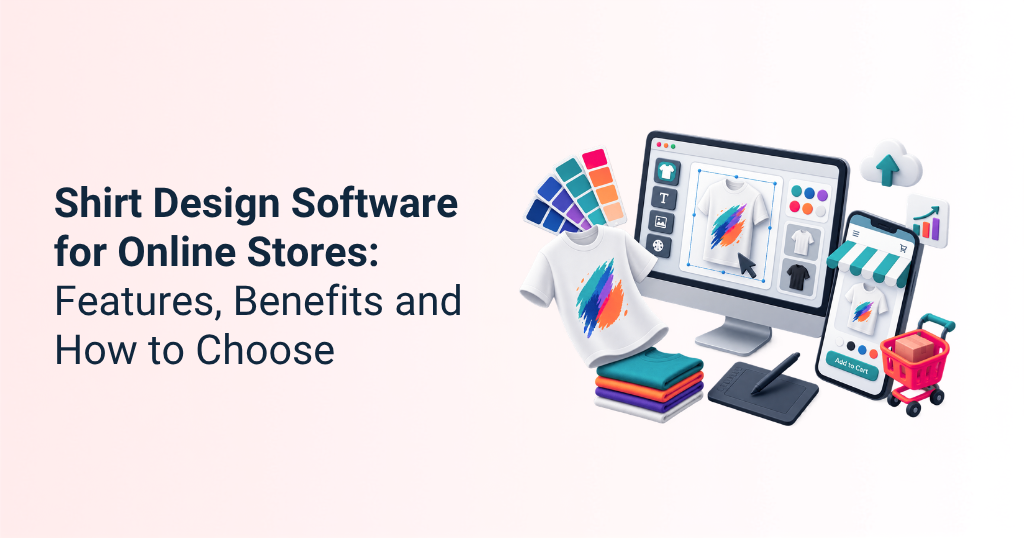
Shirt design software is an online tool that lets customers customize shirts with text, images, graphics, colors, and other design elements before placing an order.
An online shirt designer is an interactive web-based application. It integrates directly into your online store environment. It provides a visual canvas where buyers modify garments in real time.
The customer-facing interface handles style selection, color picking, logo uploads, and 3D rendering previews. Depending on the platform, the backend can calculate customized pricing and generate production-ready artwork files for downstream fulfillment.
A basic shirt design tool only offers simple artwork canvas features. Advanced shirt customization software handles complete operational workflows. It links live editing directly to store pricing, inventory management, print production, and shipping systems.

Key Features to Look for in Shirt Design Software
An effective shirt design tool must blend visual creativity with back-end automation to ensure a smooth purchasing process for your shoppers. It needs to give users full artistic control over their apparel while giving store owners the exact data required to print products accurately. Below are the primary features to look for when choosing the right solution for your online store.
Real-Time Shirt Customization
Customers expect instant feedback during customization. Live visual updates display every text edit, artwork resize, and placement change instantly on the screen.
Text and Typography Tools
The shirt design tool must provide comprehensive font libraries. Users need curved text options, outline effects, color pickers, and precise text alignment controls.
Image and Logo Upload
Shoppers frequently upload personal photo files or corporate logos. Powerful shirt customization software accepts PNG, JPG, and SVG formats. It automatically alerts users if image resolution is too low for physical printing.
Clipart and Design Libraries
Integrated graphic libraries help shoppers who lack artwork. Pre-loaded vectors, icons, and illustrations jumpstart artwork creation inside the online product designer tool.
Multiple Print Areas
Designs are rarely limited to the chest area. Your shirt design software must support printing on the front, back, sleeves, collar, and custom tags. Supported locations include left or right chest pockets, full front or back graphics, sleeve accents, and internal brand tag areas.
Color and Product Selection
Shoppers must easily switch garment base colors. The online design tool immediately renders uploaded artwork against the updated background shirt shade.
Design Templates
Pre-made layouts simplify customization. Editable design templates enable shoppers to create professional artwork within minutes.
Mobile-Friendly Online Shirt Designer
A significant share of ecommerce activity now happens on mobile devices, making responsive customization experiences essential.
Dynamic Customization Pricing
Costs change based on design complexity. Integrated shirt customization software for ecommerce automatically recalculates prices based on color count, print areas, and extra artwork layers.
Ecommerce and Order Management Integration
The tool must connect natively with platforms like Shopify, WooCommerce, or Magento. Effortless data flow keeps cart details, product variations, and customer designs perfectly synchronized.
Print-Ready Design Output
The software should generate production-ready artwork files (PDF, SVG, or high-res PNG). This eliminates manual graphics preparation and sends files straight to printing machines.
What Are the Benefits of Shirt Customization Software for Ecommerce?
Implementing dedicated shirt customization software for ecommerce transforms retail operational metrics across multiple departments:
- Elevate Customer Engagement: Interactive tools turn passive web browsing into an engaging creative experience.
- Command Higher Margins: According to research from Deloitte, consumers willingly pay a premium for personalized products over standard off-the-shelf items.
- Increase Conversion Rates: Real-time design previews remove buying hesitation, giving shoppers confidence before checkout.
- Raise Average Order Value (AOV): Dynamic pricing structures encourage buyers to add back prints, sleeve graphics, and premium embroidery options.
- Eliminate Manual Proofing: Automated digital proofs remove endless email back-and-forth approval loops entirely.
- Manage Fulfillment: Generating print-ready files automatically routes orders straight to direct-to-garment (DTG) or screen-printing machinery.
- Support Scalable Personalization: Brands process thousands of unique orders daily without adding customer service staff.
- Minimize Order Errors: Clear visual confirmations mean shoppers receive exact designs, significantly reducing returns.
- Drive 24/7 Sales: An automated online shirt designer collects orders continuously without human intervention.
Shirt Design Tool vs. Shirt Design Software: What is the Difference?
| Capability Feature | Basic Shirt Design Tool | Advanced Shirt Design Software |
| Primary Focus | Simple artwork manipulation | Complete ecommerce & production end-to-end workflow |
| Print Output | Low-res preview images | High-resolution print-ready files (300 DPI raster output and production-ready vector formats) |
| Price Calculations | Static product pricing | Dynamic price updates based on print zones and layers |
| Platform Integration | Standalone canvas widget | Full platform integration (Shopify, WooCommerce, Magento) |
| Workflow Automation | Manual file checks required | Automated routing to production facilities |
A basic shirt design tool lets users overlay text on an image. In contrast, robust shirt design software powers full-scale commercial operations. It connects product customization with inventory, dynamic pricing, cart processes, and manufacturing pipelines.
How to Choose the Best Shirt Design Software for Online Stores?
Finding the best shirt design software for online stores requires reviewing key functional capabilities against your store’s technical requirements.
Evaluate Customization Capabilities
Test vector editing, font rendering, and multi-layer support within the apparel design software. Ensure users can easily position elements.
Check Ecommerce Compatibility
Confirm native integration with your current ecommerce store platform. Data must transfer between your cart and the design engine effortlessly.
Look for Real-Time Preview
Ensure the visual editor renders high-resolution previews without lagging. Instant feedback keeps buyers engaged during design creation.
Consider Mobile Responsiveness
Test the online product designer tool user experience thoroughly on mobile devices. Interfaces must remain clear on small touchscreens.
Assess Integration Options
Confirm robust API support for custom backend architecture connections. This ensures long-term operational flexibility.
Check Print and Production Support
Verify automated generation of production-ready vector PDF or high-res PNG outputs. This eliminates prepress manual work completely.
Evaluate Scalability
Choose software that handles sudden website traffic spikes effortlessly during promotional sales and seasonal peaks.
Review Pricing and Total Cost
Balance monthly subscription fees against custom order transaction costs. Account for potential integration expenses during setup.
Consider Customer and Technical Support
Verify that the software provider offers reliable technical support for fast issue resolution. Prompt help prevents costly downtime.
Quick Buying Checklist
To quickly evaluate software options, ensure your chosen solution meets these foundational standards:
- Fast mobile interface rendering without lag
- Native ecommerce cart integration with your platform
- Automatic dynamic pricing calculations per element
- Instant print-ready output generation in vector formats
- Flexible print area configuration options across all products
Consider a corporate supplier handling bulk corporate wear orders. Clients frequently request custom polo shirts with logo placements across the chest, sleeves, and back. Manually review vector logos and email proofs delayed orders by day.
By integrating an online shirt designer for clothing brands, corporate clients upload vector logos directly, position them on digital mockups, and approve proof instantly. Automated file checks verify image quality instantly, cutting production processing times dramatically.
To give you another example, consider that a growing streetwear store wants to offer custom oversized tees. Their legacy site used static text boxes, leaving buyers unsure how final prints would look.
Implementing a 3D shirt customization software engine lets shoppers view real-time 360-degree garment renders. According to data from McKinsey & Company, brands implementing interactive personalization strategies routinely see revenue increases between 5% and 15%.
Common Challenges When Implementing Shirt Customization Software
Implementing custom software presents predictable operational challenges. Here is how modern solutions can address them:
- Poor Mobile Rendering: Mobile interfaces feel cramped on smaller screens. Modern apparel design software utilizes mobile-first drawer menus and responsive Touch UI elements.
- Slow Rendering Speeds: High-resolution image assets can slow down web browsers. Cloud-hosted online design tool engines process complex rendering tasks on dedicated external servers.
- Low-Quality Uploaded Artwork: Customers frequently upload pixelated, low-resolution web images. Built-in file analyzers check DPI thresholds before checking out, instructing users to upload higher-resolution files.
- Inaccurate Print Positioning: Artwork alignment on digital screens might not match physical printing parameters. Software bounding boxes constrain design elements within precise, verified physical print boundaries.
- Manual Production Workflows: Re-keying customer design data manually creates operational drag. The software exports print-ready vector files straight to direct-to-garment (DTG) print queues.
Conclusion
For apparel businesses, the right shirt design software should do more than provide a customization canvas. It should connect customer design experiences with ecommerce, pricing, order management, and production workflows.
At iDesigniBuy, we follow a comprehensive business-focused approach. We partner closely with online retailers to understand your exact commercial vision. Our goal is to maximize your return on investment, optimize business profitability, and boost operational efficiency.
The experienced team of iDesigniBuy brings multidimensional expertise in custom product tools. We combine creative design and software engineering to bring your custom shirt project to life.

Frequently Asked Questions
1. What is shirt design software?
Shirt design software is an interactive web tool allowing customers to customize garments with text, logos, graphics, and color selections online before completing checkout.
2. What is the best shirt design software for online stores?
The best software integrates effortlessly with your ecommerce platform, provides highly responsive mobile controls, calculates dynamic pricing automatically, and generates production-ready vector files.
3. How does an online shirt designer work?
It loads a digital canvas directly within an online product page. Customers visually design their product, preview final renders, and place orders with artwork attached automatically.
4. Can shirt design software integrate with ecommerce stores?
Yes, modern tools integrate natively with popular ecommerce platforms like Shopify, Magento, WooCommerce, and custom web setups through API connections.
5. How much does shirt design software cost?
Pricing typically ranges from fixed monthly subscription models for standard plugins to custom enterprise licensing for customized, complex platform setups.
6. Can shirt design software generate print-ready files?
Depending on the platform, shirt design software can generate production-ready vector formats such as SVG and PDF, along with high-resolution raster formats such as PNG.