Running a custom apparel business in today’s fast market is tough. Customers want personalized gear instantly and want to see what it looks like before buying. If you still rely on back-and-forth emails, static artwork proofs, and manual order entries, you are losing valuable ground.
That is where modern T-shirt design software changes everything. It turns your online store into an interactive canvas where buyers create their own gear in minimal time. In this complete guide, we will walk you through how to pick the ideal interactive tool to scale your brand, boost sales, and delight your customers.
Key Takeaways
- Integrating online T-shirt design software cuts order processing times and eliminates proofing mistakes.
- Real-time 3D rendering and instant pricing calculators directly boost store conversion rates and customer satisfaction.
- Choosing scalable web-to-print tools ensures smooth integration with platforms like Shopify, WooCommerce, and Magento.
- Automated print-ready vector file generation (SVG/PDF) removes manual artwork prep for faster turnarounds.

What Is T-Shirt Design Software and How Does It Work?
T-shirt design software is a Web-to-Print web application that allows buyers to personalize apparel online with custom text, clipart, and uploaded images. It works by generating high-resolution, print-ready output files (like SVG or PDF) automatically and synchronizing them directly into your order fulfillment system.
Personalized apparel demand is booming across retail and corporate markets. To keep up, modern print businesses rely on apparel design software and digital tools that automate design, proofing, and production setup.
According to Grand View Research, the global custom t-shirt printing market size was valued at USD 4.31 billion in 2022. It is further projected to expand at a CAGR of 11.1% through 2030, driven by automated web-to-print personalization tools.
Core Components of a T-Shirt Design Platform
A solid platform combines a user front-end with a powerful print engine. It includes a graphic studio, stock library, and order processing module.
- Design Canvas: Interactive visual area where customers manipulate text, logos, colors, and layouts.
- Asset Repository: Pre-loaded clipart libraries, Google Fonts, and curated background templates.
- Print Engine: Backend system converting browser designs into vector-sharp production files automatically.
How the Design-to-Production Workflow Works?
The workflow moves efficiently from visual creation directly to print machines. It removes all friction between customer purchase and shop floor execution.
Customers can create and customize their apparel designs directly on your website from any device, making the buying experience simple and interactive. As they finalize their designs, the apparel design software automatically generate instant visual proofs, eliminating lengthy email approval cycles. Once approved, it exports production-ready files in formats such as SVG, PDF, or PNG with the correct DPI and color profiles, ensuring smooth and accurate printing.
Who Uses T-Shirt Design Software?
Various businesses rely on this technology to scale their personalized product offerings. From small creators to massive factories, it fits every scale.
- E-commerce Retailers: Online storefronts selling personalized merchandise directly to consumer markets.
- Print-on-Demand (POD) Brands: Sellers running zero-inventory businesses via automated fulfillment partners.
- Commercial Printers: Screen printers, DTG specialists, and embroidery houses handling bulk client orders.
Business Model vs. Software Requirements Comparison
| Business Model | Primary Operational Goal | Key Software Advantage | Output Requirement |
| Print-on-Demand (POD) | Zero inventory & fast delivery | Automated order routing & mockups | Instant PNG / Vector export |
| Custom Apparel Manufacturer | Bulk production efficiency | Gang sheet setup & color separation | High-res PDF / Print-ready SVG |
| Promotional Goods Supplier | B2B team ordering | Name/number rosters & multi-asset rules | Precision alignment vectors |
Why Do Businesses Need T-Shirt Design Software?
Businesses need T-shirt design software to replace manual design proofing, lower labor costs, and prevent costly misprints. It gives customers a self-service design portal that boosts engagement, elevates average order value (AOV), and scales order output without adding headcount.
Relying on old-fashioned manual processes stalls your business growth and exhausts your team. Modern print buyers expect instant visual gratification and self-service control when ordering online.
Challenges of Manual Design and Order Processing
Manual artwork proofing slows order fulfillment and increases operational costs. Designers often spend valuable time recreating customer ideas while teams exchange multiple emails to finalize design details. Low-quality artwork can lead to printing errors and reprints, and manual pre-flight checks further delay DTG and screen-printing production.
Benefits for Print-on-Demand Businesses
Print-on-demand operators thrive on speed, efficiency, and automated workflow integration. Software automation makes handling micro-orders profitable and effortless.
- Zero Inventory Costs: Print only what customers create and buy in real time.
- Instant Mockup Generation: Show realistic product previews without expensive photo shoots or manual graphics.
- Scalable Product Lines: Expand from T-shirts to hoodies and polo caps with zero setup delay.
Advantages for Custom Apparel Manufacturers
Large-scale manufacturers handle complex, high-volume orders every day, making accuracy and efficiency essential. Specialized T shirt design software automates pre-flighting and prepares print-ready files with proper color separation. The apparel design software also reduces fashion waste and aligns bulk approval workflows. This further helps production teams reduce errors, accelerate turnaround times, and maintain consistent print quality.
How It Improves Customer Buying Experience?
An interactive, easy-to-use editor empowers buyers and gives them total confidence. Satisfied customers buy more frequently and leave stellar reviews.
- WYSIWYG (What You See Is What You Get) Transparency: Customers see exactly what the final product will look like before checkout.
- Interactive Creativity: Fun, simple drag-and-drop elements make customization fast and enjoyable.
- Fewer Order Disputes: What they design on screen is what arrives at their doorstep.
What Are the Essential Features to Look for in T-Shirt Design Software?
Essential features include an intuitive drag-and-drop editor, 3D real-time rendering, dynamic pricing calculators, automated file generation, and smooth e-commerce integration. These tools ensure both customer delight and backend manufacturing precision.
Not all customization software delivers equal performance. To maximize your return on investment, you need a solution packed with features tailored for both retail shoppers and print operators.
Selecting feature-rich custom T-shirt design tool helps you stay competitive in an ever-shifting retail market.
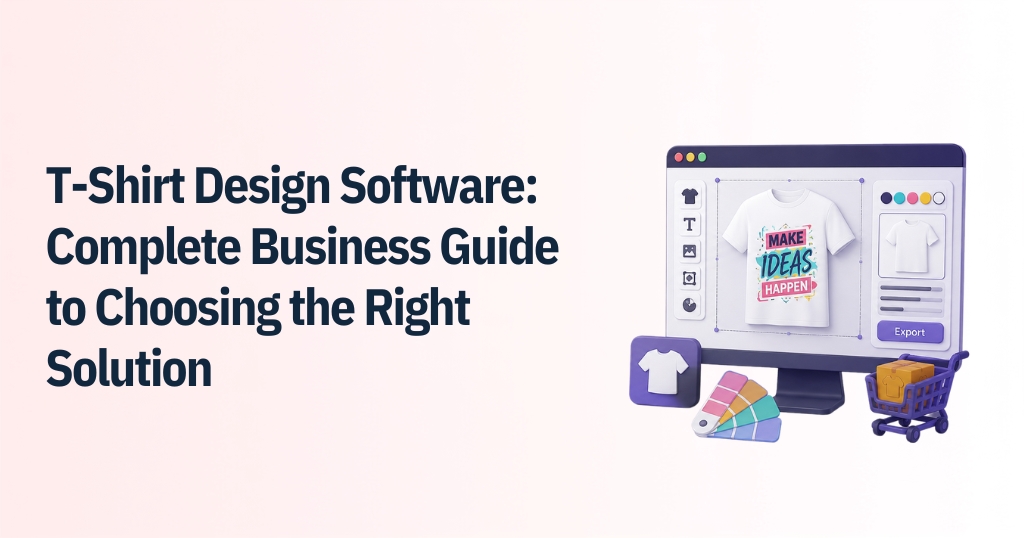
- Drag-and-Drop Design Editor: Enable users to create custom apparel effortlessly with an intuitive editor featuring easy layer management and built-in graphics, fonts, and design elements.
- Product Customization Options: Allow customers to personalize apparel across multiple print areas, decoration methods, and product types from a single interface.
- Real-Time Design Preview: Display interactive, high-quality previews with 3D visualization and 360° views so customers can confidently review designs before ordering.
- Artwork Upload and Image Editing: Let users upload logos and images while automatically enhancing artwork with vectorization, background removal, and quality checks.
- Size, Color, and Variant Management: Simplify product personalization with dynamic color changes, automatic artwork scaling, and support for names, numbers, and multiple variants.
- Pricing Calculator: Build pricing transparency by automatically updating costs based on design choices, order quantities, and printing methods.
- Order Management Integration: Connect the design tool with production workflows by generating print-ready files, job sheets, and syncing inventory in real time.
- Mobile-Friendly Design Experience: Deliver a responsive, touch-optimized design experience that works efficiently across smartphones, tablets, and desktops.
What Are the Types of T-Shirt Design Software?
The primary software types are cloud-based SaaS online design tools, enterprise-grade custom solutions, print-on-demand integrated platforms, and comprehensive web-to-print engines. Each type suits specific business sizes, tech stacks, and production volumes.
Every apparel business operates under a unique model. Understanding these software categories ensures you choose technology aligned with your specific growth goals.
Online Design Tools
SaaS-based plugins built for fast deployment on small to medium-sized e-commerce stores. They provide plug-and-play simplicity with low setup overhead.
- Quick Setup: Easy installation on platforms like Shopify, WooCommerce, and BigCommerce.
- Subscription Pricing: Predictable monthly operational costs based on usage tiers.
- Automatic Updates: Cloud updates ensure your site always runs the latest software features.
Enterprise Design Software
Custom-built solutions customized for large apparel brands and high-volume manufacturers. Built to match complex internal workflows and custom hardware setups.
- Bespoke Workflows: Fully customized UI/UX designed around your exact operational rules.
- Dedicated Server Host: Built for high scalability, supporting thousands of concurrent users during rush seasons.
- ERP & API Systems: Deep API integration with proprietary factory production software.
Print-on-Demand Design Platforms
These are specialized tools created for direct-to-consumer POD sellers and drop shipping suppliers. They bridge storefront design directly with automated print fulfillment centers.
- Automated Routing: Sends customer orders directly to global print hubs automatically.
- Mockup Generators: Creates photorealistic lifestyle images for product catalogs instantly.
- Zero Inventory Friction: Simplifies merchant operations by keeping overhead costs low.
Web-to-Print Solutions
Comprehensive end-to-end commercial software connecting front-end customization with back-end print shop machinery. Built specifically for professional print shop managers.
- Pre-Flight Automation: Checks resolutions, bleeds, and color spaces before rendering production files.
- Gang Sheet Generation: Bundles multiple print orders onto single sheets to minimize material waste.
- Multi-Store Management: Manage storefronts and product catalogs from a single dashboard.
How to Choose the Right T-Shirt Design Software?
Choose the right software by auditing your printing techniques, assessing your store platform compatibility, prioritizing mobile responsiveness, and evaluating vendor support. Look for transparent pricing models that scale cleanly as your order volume grows.
Selecting the right software partner is a major strategic decision. Asking the right technical and operational questions upfront saves time, money, and customer friction down the road.
Define Your Business Requirements
Start by identifying your business needs, including supported decoration methods, product categories, and expected order volumes. This helps you narrow down software that aligns with your current operations and future growth.
Evaluate Customization Capabilities
Assess how easy it is for customers to personalize products across desktop and mobile devices. Look for flexible design tools, quality rendering, and an intuitive interface that simplifies the design experience.
Check Integration with Ecommerce Platforms
Choose software that integrates smoothly with your ecommerce platform and existing systems. Native plugins, API support, and real-time inventory synchronization help ensure smooth order processing.
Consider Scalability and Performance
Select a solution that can handle growing traffic without affecting site speed. Cloud-based infrastructure, optimized code, and global content delivery ensure fast and reliable performance.
Compare Pricing Models
Compare subscription plans, licensing options, and transaction fees to understand the total cost of ownership. Choose a pricing model that fits your budget while supporting long-term business growth.

Conclusion
Investing interactive product customization software has become a mandate for growing apparel brands. By replacing manual artwork approvals with self-service 3D design tools, you eliminate production friction. You further protect your profit margins and offer a shopping experience that turns casual browsers into loyal brand advocates.
At iDesigniBuy, we follow a 360-degree business marketing approach. We partner directly with you to understand your unique business vision, optimize profitability, and drive measurable ROI. Our vibrant team of experienced developers and designers brings your visual customization ideas to life. From standard tools to fully custom product design engines, your wish is our command.
Frequently Asked Questions
1. What is T-shirt design software?
T-shirt design software is an interactive web-based customization tool that lets online shoppers personalize apparel with custom text, graphics, and images directly on your store. It automatically generates high-resolution, print-ready files for factory production.
2. What features should the best T-shirt design software have?
The best T-shirt design software should feature a drag-and-drop editor, 3D real-time visual previews, dynamic pricing updates, background removal, vector output exports (SVG/PDF), and seamless mobile responsiveness.
3. Is T-shirt design software suitable for small businesses?
Yes! It is ideal for small businesses and start-ups. Automating design proofing and artwork setups allows small teams to process higher order volumes without hiring dedicated graphic design staff.
4. Can T shirt design software integrate with Shopify or WooCommerce?
Absolute integration is standard. Solutions like iDesigniBuy plug natively into Shopify, WooCommerce, Magento, and custom PHP/Laravel storefronts for seamless catalog and order syncing.
5. How does T-shirt design software help reduce production errors?
By generating print-ready vector artwork files directly from the customer’s visual design, human manual pre-flight mistakes, incorrect color selections, and poor-resolution misprints are eliminated.
6. What is the difference between T-shirt design software and web-to-print software?
T-shirt design software focuses specifically on garment visual design features like fabric color switching and print zones. Web-to-print software is a broader suite covering print prep, order batching, gang sheet creation, and print shop workflow management.
7. Can customers create their own T-shirt designs using t-shirt design software?
Yes. Customers can upload personal artwork, adjust typography, pick stock clipart, add dynamic team names and numbers, and preview their unique creations live in photorealistic 3D.
8.How do I choose the right T-shirt design software for my business?
Evaluate your decorating methods (DTG, screen print, embroidery), check e-commerce framework compatibility, test mobile performance, verify vector output quality, and choose a vendor providing ongoing technical support.